Core Web Vitals Explained for SEO
 Martyn Rance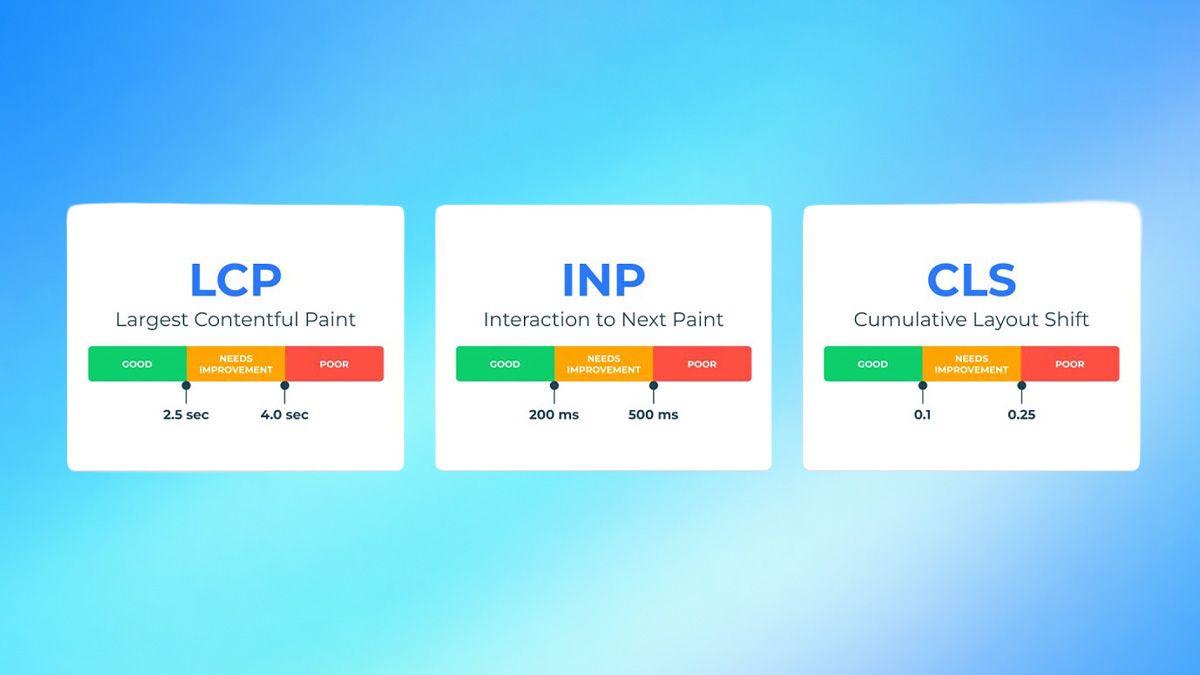
In its ongoing effort to reward websites that provide a superior user experience, Google uses a set of specific metrics known as Core Web Vitals (CWV). These metrics measure the real-world user experience of a webpage based on loading performance, interactivity, and visual stability.
Core Web Vitals are officially part of Google's "Page Experience" ranking signals. If your site provides a fast and seamless experience, you are more likely to rank higher in search engine results pages (SERPs) and keep users engaged, ultimately driving more conversions.
Here is a breakdown of what Core Web Vitals are, how they are measured, and how you can optimize them for SEO.
The Three Core Web Vitals Metrics
To pass the Core Web Vitals assessment, a webpage must score "Good" across three specific metrics based on real-world user data.
1. Largest Contentful Paint (LCP) LCP measures perceived loading speed. Specifically, it records the time it takes from when the page starts loading to when the largest text block or image element is fully rendered on the screen.
- The Target: To provide a good user experience, your LCP should occur within 2.5 seconds or less.
- How to Improve: You can optimize your LCP score by compressing images, utilizing modern next-gen image formats (like WebP), implementing lazy-loading for non-critical assets, and using a Content Delivery Network (CDN) to reduce server response times.
2. Interaction to Next Paint (INP) INP measures a page's overall responsiveness to user interactions. Replacing the older First Input Delay (FID) metric, INP evaluates the latency of all user interactions (like clicking a link, tapping a button, or pressing a key) throughout the entire lifespan of a user's visit.
- The Target: A good INP score is 200 milliseconds or less.
- How to Improve: High INP is often caused by heavy scripts tying up the browser. You can improve this by reducing JavaScript execution time, minimizing work on the main thread, and mitigating the impact of third-party code.
3. Cumulative Layout Shift (CLS) CLS measures visual stability by calculating the sum total of all unexpected layout shifts that occur while the page is loading. A poor CLS score happens when content suddenly "jumps" or moves, which can cause users to lose their place or accidentally click the wrong button.
- The Target: Your CLS score should be 0.1 or less.
- How to Improve: You can prevent layout shifts by always specifying size attributes (width and height) for your images and videos, and by reserving space for dynamic content like ads so they do not push existing content down when they load.
How Google Measures CWV: Field Data vs. Lab Data
When analyzing Core Web Vitals, it is critical to understand the difference between the two types of data Google uses:
- Field Data: This data is gathered from actual, real-world users navigating your site via the Chrome User Experience Report (CrUX). Field data accounts for varying devices and network connections. This is the data Google actually uses to determine if you pass the Core Web Vitals assessment.
- Lab Data: This data is collected in a controlled environment with predefined device and network settings, completely independent of real users. Lab data (often collected via tools like Lighthouse) is best used for debugging and testing performance improvements before waiting weeks for new field data to accumulate.
Tools to Audit Your Core Web Vitals
To identify bottlenecks and track your performance, Google provides several free tools:
- Google Search Console (GSC): GSC features a dedicated "Core Web Vitals" report that uses CrUX field data to show how your URLs perform on both mobile and desktop. It groups similar URLs together (e.g., all blog posts or all product pages) to help you identify template-level issues that are holding back your site's performance.
- PageSpeed Insights: This tool allows you to submit a specific URL and view both its real-world field data and its Lighthouse lab data. It also provides actionable "Opportunities" and "Diagnostics" to help you understand exactly which resources are slowing your page down.
By proactively monitoring your Core Web Vitals and prioritizing fast, stable, and responsive web pages, you satisfy both Google's ranking algorithms and your human visitors, paving the way for long-term SEO success.